Operating System Lecture 3: Processes and Threads
What Is a Process?
Definition:
A process is a program in execution.
Required Resources:
- CPU time
- Memory
- Files
- I/O devices
These resources are allocated when the process is created or during execution.
Types of Processes
- Operating System processes – execute system code.
- User processes – execute user code.
Characteristics:
- Processes can execute concurrently.
- CPU(s) are multiplexed among them for productivity.
- OS executes a variety of programs:
- Batch systems: jobs
- Time-shared systems: user programs or tasks
Process Management
The operating system handles:
- Creation and deletion of user/system processes.
- Process scheduling.
- Synchronization, communication, and deadlock handling mechanisms.
Process in Memory
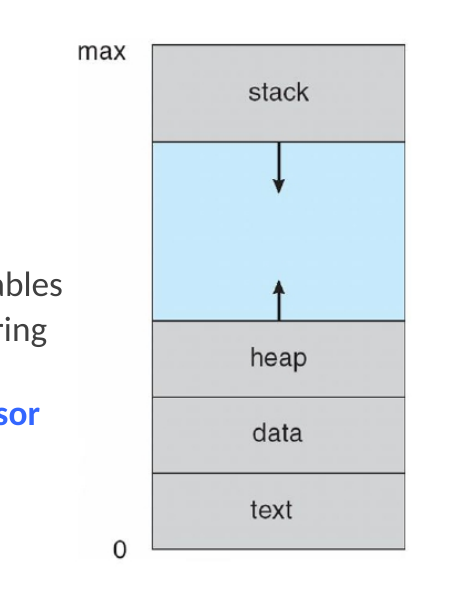
A process consists of:
- Text section – program code.
- Data section – global variables.
- Stack – temporary data (function parameters, return addresses, local variables).
- Heap – dynamically allocated memory.
- Current activity – program counter and processor registers.
Program vs Process
| Aspect | Program | Process |
|---|---|---|
| Nature | Passive (on disk) | Active (in execution) |
| State | Stored executable file | Executing instance |
| Creation | Becomes process when loaded | Created via execution |
| Example | Multiple users running same program = multiple processes |
Execution can start via GUI interaction or command line.
Process States
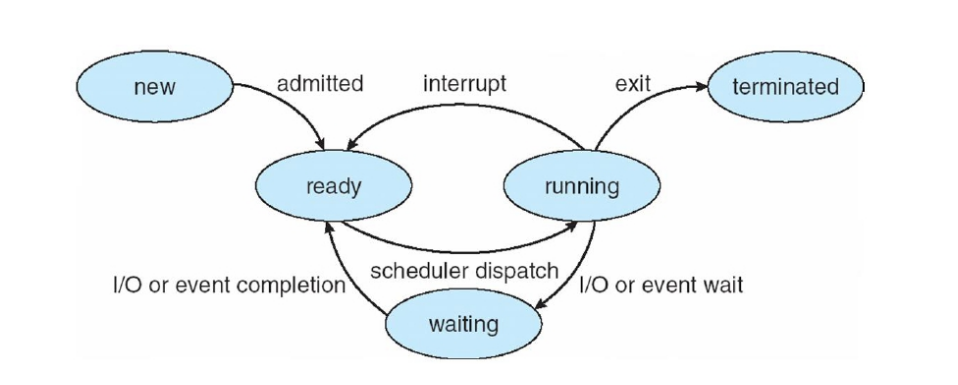
As a process executes, it transitions through these states:
| State | Description |
|---|---|
| New | Being created |
| Running | Instructions are executing |
| Waiting | Waiting for an event (e.g., I/O) |
| Ready | Waiting to be assigned to CPU |
| Terminated | Finished execution |
Process Control Block (PCB)
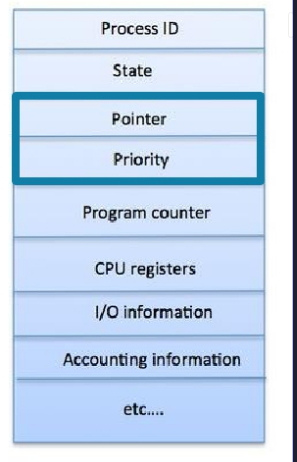
A PCB (or Task Control Block) holds all process-related information:
- Process state
- Program counter (next instruction)
- CPU registers
- CPU scheduling info (priority, queue pointers)
- Memory management info (allocated memory)
- Accounting info (CPU usage, elapsed time)
- I/O status info (allocated devices, open files)
Context Switch
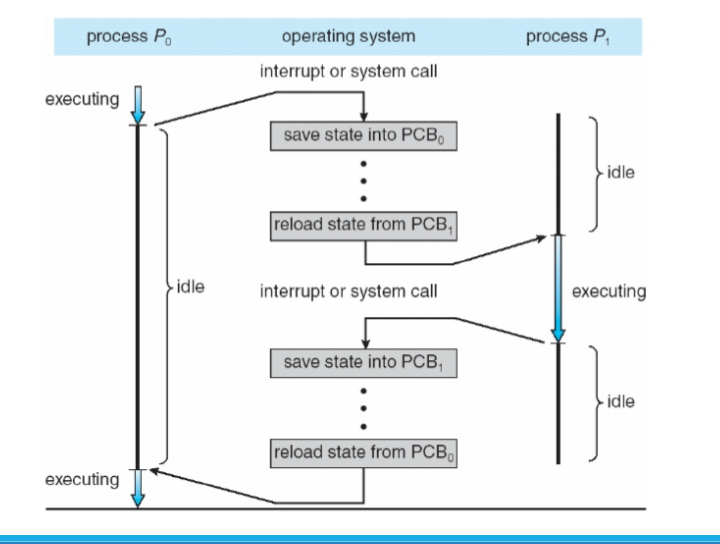
When switching CPU execution from one process to another:
- The OS saves the state of the old process and loads the new one.
- The process state is represented in its PCB.
- Context-switch time is overhead — no useful work occurs during it.
- Dependent on hardware — systems with multiple register sets support faster switching.
Process Scheduling
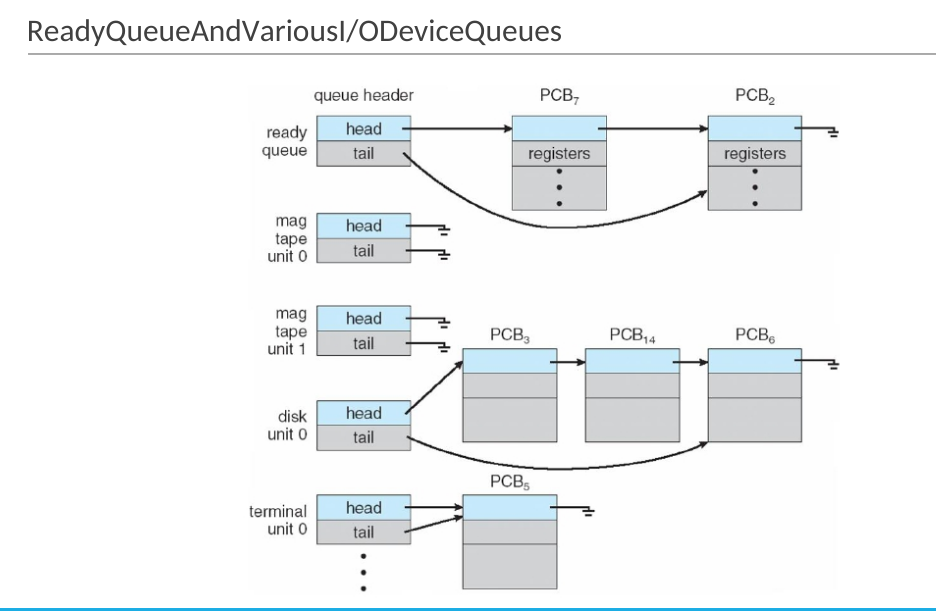
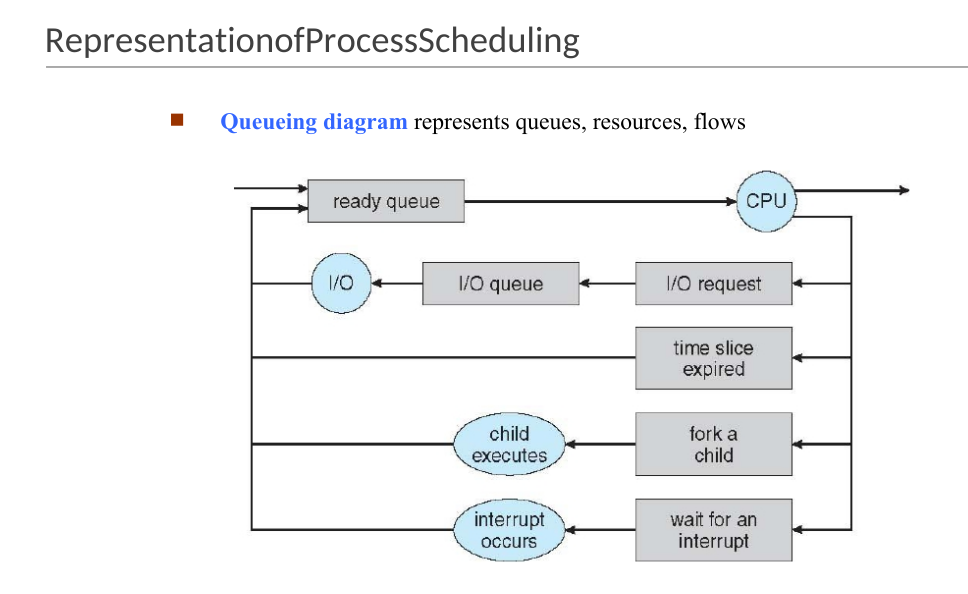
Goal: Maximize CPU utilization through efficient process switching.
Queues:
- Job queue: all processes in the system.
- Ready queue: processes in main memory, ready for execution.
- Device queues: processes waiting for I/O devices.
Processes migrate among these queues during execution.
Schedulers
| Scheduler | Frequency | Role |
|---|---|---|
| Short-term (CPU) | Frequent (ms) | Selects next process for CPU |
| Long-term (Job) | Infrequent (s or min) | Controls degree of multiprogramming |
Process types:
- I/O-bound: spends more time in I/O, many short CPU bursts.
- CPU-bound: spends more time computing, few long CPU bursts.
Medium-Term Scheduler
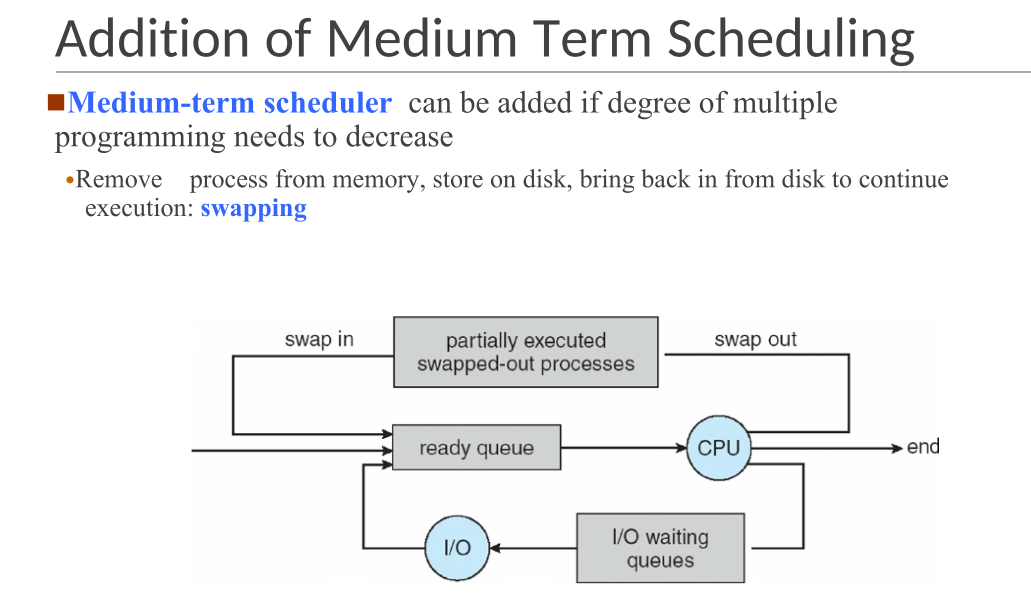
- Used to reduce multiprogramming degree.
- Performs swapping: temporarily removes processes from memory to disk.
Threads
Initially, each process had a single thread of execution.
To enable parallelism, a process may contain multiple threads, each with its own:
- Program counter
- Register set
- Stack
All threads share:
- Code section
- Data section
- OS resources (e.g., open files, signals)
What Is a Thread?
A thread is the smallest unit of CPU execution.
Each thread includes:
- Thread ID
- Program counter
- Register set
- Stack
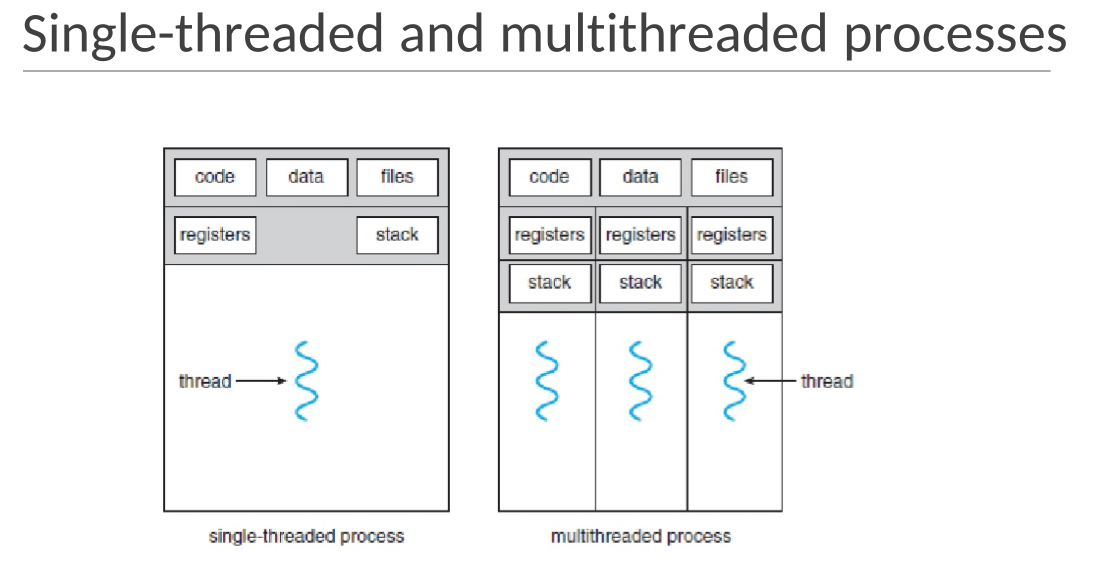
Threads within a process share:
- Code
- Data
- OS resources
If multiple threads exist, the process can perform multiple tasks simultaneously.
Examples
Example 1: Word Processor
- One thread for UI and display.
- One for user input (keystrokes).
- One for background tasks (spelling/grammar check).
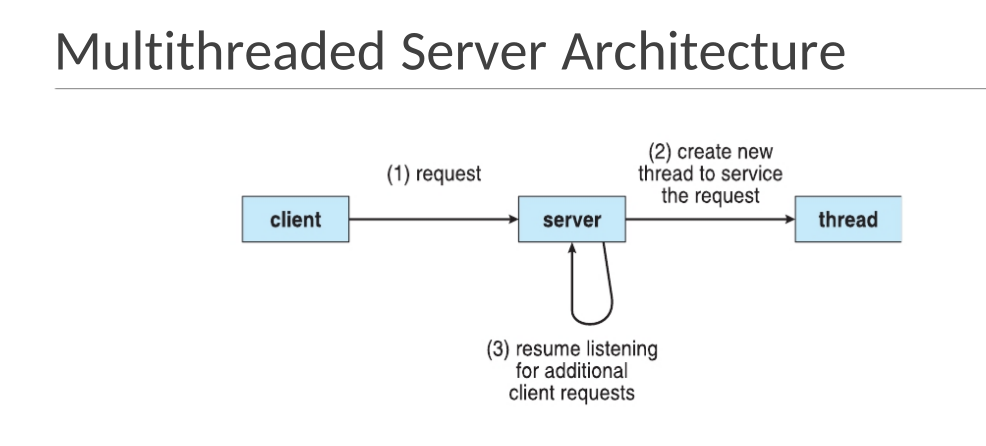
Example 2: Web Server
- Each client request handled by a separate thread.
- Enables handling thousands of concurrent clients efficiently.
- Single-threaded servers can only handle one client at a time.
Benefits of Multithreading
- Responsiveness: UI remains active even if part of the process is blocked.
- Resource Sharing: Threads share process resources easily.
- Economy: Creating threads is cheaper than creating processes.
- Scalability: Multiple threads can utilize multiprocessor systems efficiently.
Multithreading Models
1. Many-to-One
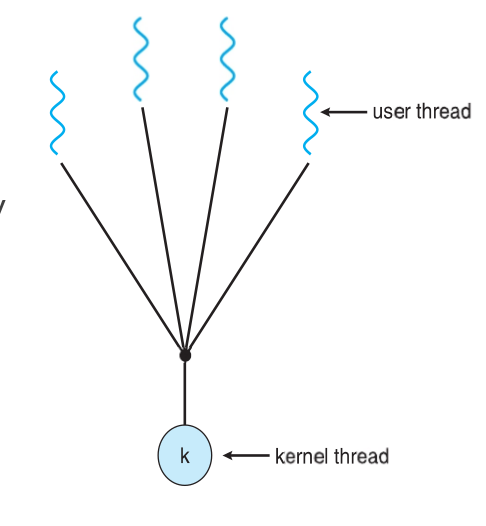
- Many user threads mapped to one kernel thread.
- If one thread blocks, all block.
- No parallelism on multicore systems.
- Examples: Solaris Green Threads, GNU Portable Threads.
2. One-to-One
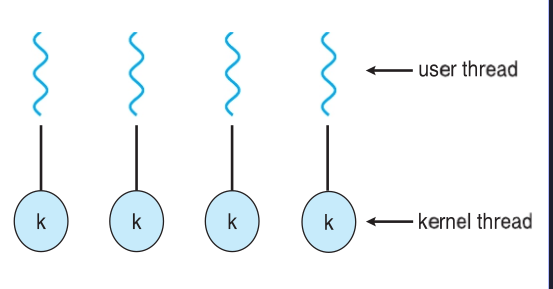
- Each user thread maps to one kernel thread.
- Higher concurrency than Many-to-One.
- Limited number of threads per process due to overhead.
- Examples: Windows, Linux, Solaris 9+.
3. Many-to-Many
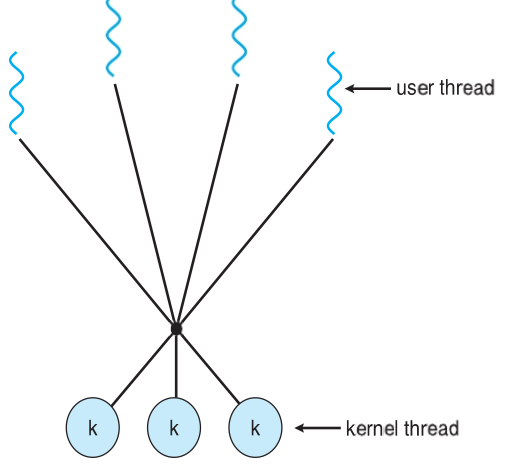
- Multiple user threads mapped to multiple kernel threads.
- OS creates enough kernel threads to handle load.
- Examples: Solaris (pre-v9), Windows ThreadFiber package.
Thread Cancellation
Terminating a thread before it finishes execution.
Approaches:
- Asynchronous cancellation: terminates thread immediately.
- Risk: may leave resources unreleased or shared data inconsistent.
- Deferred cancellation: thread periodically checks for cancellation signals.
Signal Handling
Used in UNIX systems to notify a process of an event.
Mechanism:
- Signal generated by an event.
- Delivered to a process.
- Handled by:
- Default handler (provided by kernel)
- User-defined handler (overrides default)
Single-threaded: signal delivered to process.
Multi-threaded: delivery options include:
- To the specific thread concerned.
- To every thread in the process.
- To specific designated threads.
- To a single thread assigned to handle all signals.
Difference Between Process and Thread
| Comparison Aspect | Process | Thread |
|---|---|---|
| Resource Usage | Heavyweight, resource-intensive | Lightweight, less resource usage |
| Switching | Requires OS intervention | Does not require OS intervention |
| Memory & File Resources | Each has its own memory and files | Shares memory and open files |
| Blocking Behavior | One blocked process halts its execution only | Other threads can continue even if one is blocked |
| Resource Efficiency | Uses more resources when multiple processes run | More efficient; uses fewer resources |
| Independence | Operates independently | Threads can access and modify each other's data |