Introduction to IoT - Lecture 3
What is Raspberry Pi?
Raspberry Pi is a credit-card-sized computer that plugs into a TV and a keyboard, functioning almost like a full-fledged computer. It was developed in the United Kingdom by the Raspberry Pi Foundation to promote computer science education in schools.
Key Features:
- Fully featured microcomputer on a circuit board.
- Uses Raspberry Pi OS (Linux-based) as the recommended operating system.
- Small footprint (
cm) and affordable (priced between $5–35). - Can connect to a monitor, keyboard, and mouse.
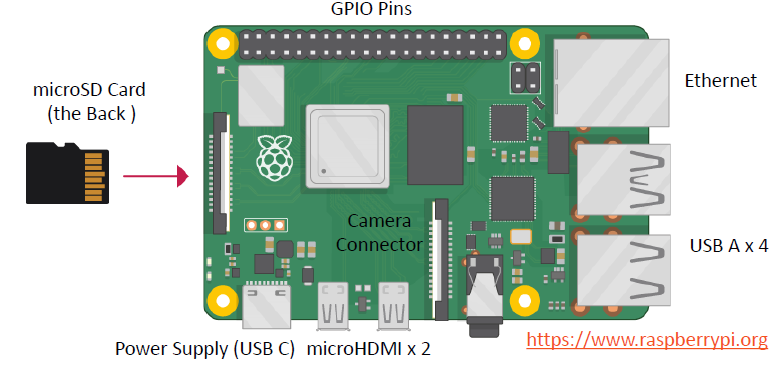
- Includes GPIO (General Purpose Input/Output) pins for interfacing with sensors and actuators.
- Ideal for learning programming, IT, and technical skills.
- Uses a microSD card as its hard drive.
Raspberry Pi Models
| Aspect/Model | Raspberry Pi 1 Model A | Raspberry Pi 1 Model A+ | Raspberry Pi 1 Model B | Raspberry Pi 1 Model B+ | Raspberry Pi 2 Model B | Raspberry Pi 3 Model B | Raspberry Pi Zero |
|---|---|---|---|---|---|---|---|
| Release Date | 2013 | 2014 | 2012 | 2014 | 2015 | 2016 | 2015 |
| SoC | Broadcom BCM2835 | Broadcom BCM2835 | Broadcom BCM2835 | Broadcom BCM2835 | Broadcom BCM2836 | Broadcom BCM2837 | Broadcom BCM2835 |
| CPU Speed | 700 MHz ARM-1176JZF-S | 700 MHz ARM-1176JZF-S | 700 MHz ARM-1176JZF-S | 700 MHz ARM-1176JZF-S | 900 MHz ARM-Cortex-A7 | 1.2 GHz ARM-Cortex-A53 | 1 GHz ARM1176JZF-S |
| Cores | 1 | 1 | 1 | 1 | 4 | 4 | 1 |
| SDRAM | 256 MB | 256 MB | 512 MB | 512 MB | 1 GB | 1 GB | 512 MB |
Raspberry Pi Features
- Uses a Broadcom SoC with an ARM CPU and VideoCore IV GPU.
- CPU speeds range from 700 MHz to 1.2 GHz, with 256 MB to 1 GB RAM.
- SD/MicroSD cards store the OS and programs.
- Includes 1 to 4 USB ports, HDMI, composite video output, and a 3.5mm audio jack.
- GPIO pins provide lower-level output for hardware interfacing.
- Networking:
- B-models have Ethernet.
- Pi 3 and Pi Zero include Wi-Fi (802.11n) and Bluetooth.
Raspberry Pi 3 Highlights
- 1.2GHz 64-bit quad-core ARMv8 CPU.
- Built-in 802.11n Wi-Fi and Bluetooth 4.1 (BLE).
- Ideal for IoT projects, with multiple sensor connectivity.
- Features a 40-pin GPIO connector for external sensors and hardware integration.
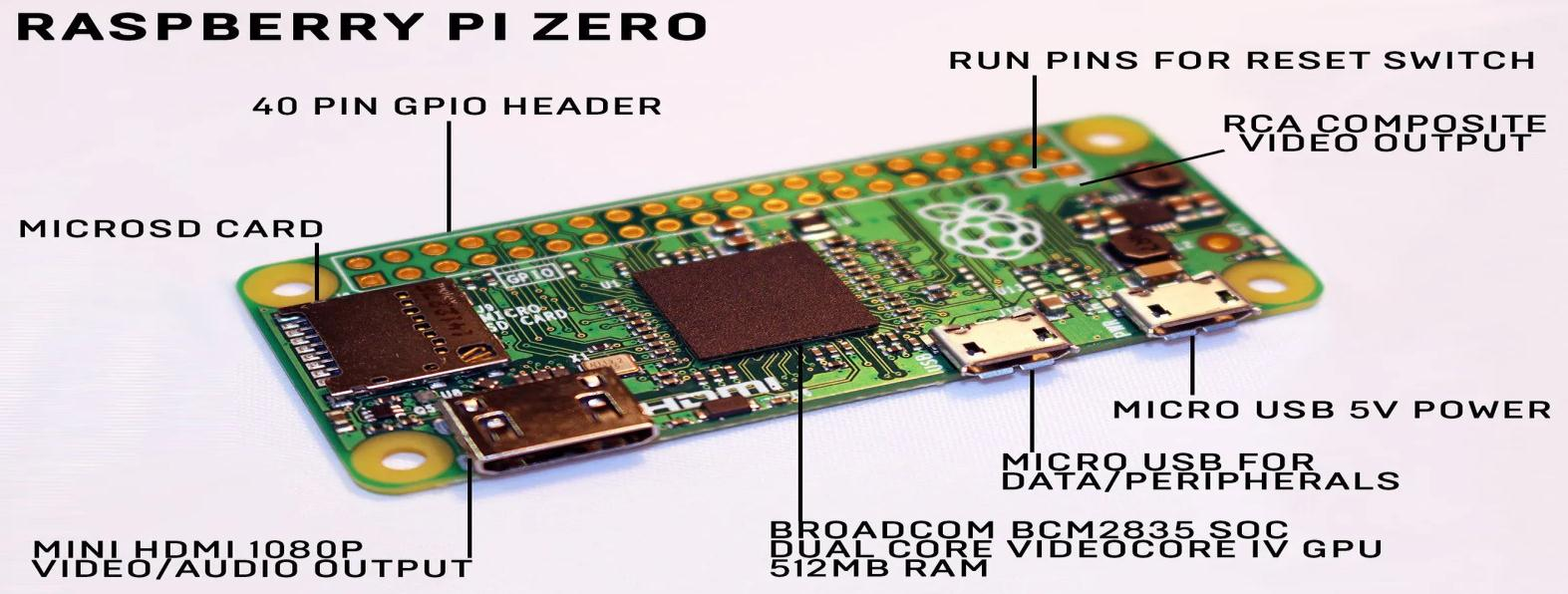
Raspberry Pi Zero
- Smallest Raspberry Pi model.
- Less powerful than the Pi 3 but ideal for embedded projects like wearables due to its compact size.
Raspberry Pi Hardware
Raspberry Pi vs. Arduino
| Arduino | Raspberry Pi |
|---|---|
| Development circuit board | Single-board computer |
| Microcontroller-based | Microprocessor-based |
| No OS | Runs Raspberry Pi OS (Linux) |
| Executes simple tasks | Can multitask with a full OS |
| Uses Arduino Shields | Uses Raspberry Pi HATs (Hardware Attached on Top) |
| Programmed in C/C++ | Supports Python, Scratch, Ruby, C, C++ |
| Logic voltage: 5V | Logic voltage: 3.3V |
| Requires shields for internet connectivity | Built-in Wi-Fi and Ethernet |
| Open-source: Can be modified by the public | Closed-source: Cannot be altered by the public |
| Standard boards cost $16–$20 | Standard boards cost ~$35 |
Strengths
Arduino:
- Analog input and PWM support
- Real-time control for motors and sensors
Raspberry Pi:
- Full Linux OS with multi-threading
- Supports multiple programming languages
- Ideal for IoT, AI, and web applications
Raspberry Pi or Arduino
- Arduino: Best for precise software timing and simple tasks.
- Raspberry Pi: Ideal for internet connectivity, video display, and camera use.
- Both: Can be used together via I2C or SPI for advanced projects.
Getting Started with Raspberry Pi
Hardware Requirements:
- Essential:
- Raspberry Pi board
- MicroSD card
- USB keyboard
- Display (HDMI, DVI, or Composite input)
- Power supply
- Recommended extras:
- USB mouse
- Internet connection (LAN or Wi-Fi)
- Heat sink for the processor
- Protective case
Operating System (OS):
- The Raspberry Pi OS (formerly Raspbian) is recommended.
- Can also run Ubuntu MATE, Windows 10 IoT Core, and other third-party OS.
- Installed using the Raspberry Pi Imager tool.
Connecting to Wi-Fi
To connect your Raspberry Pi to Wi-Fi:
- Insert the microSD card.
- Connect a monitor, keyboard, and mouse.
- Power on the device and follow on-screen instructions to set up Wi-Fi.
Using the Linux Terminal
Raspberry Pi OS (Linux based) comes with a GUI but relies heavily on terminal commands for system management.
Updating Raspberry Pi OS:
# Update package repositories
sudo apt update

# Upgrade all installed packages
sudo apt full-upgrade
Shutting Down Properly:
Unlike other devices, the Raspberry Pi has no off switch.
- Do not unplug it directly.
- Use the terminal to shut it down safely:
sudo shutdown # or sudo poweroffThis ensures a clean shutdown before unplugging the power source. To turn it back on, simply plug it in.
Remote Access
To remotely access your Raspberry Pi from a desktop computer, you can use:
- SSH – Command-line access
- Remote Desktop software, such as:
- XRDP/RDC (not for root user)
- TeamViewer
- VNC
Python with Raspberry Pi
Python, an older language (1991) compared to C# (2000), Swift (2014), Java (1995), and PHP (1995), comes pre-installed on Raspberry Pi OS with the built-in Thonny editor for coding.
LED Blinking Example:
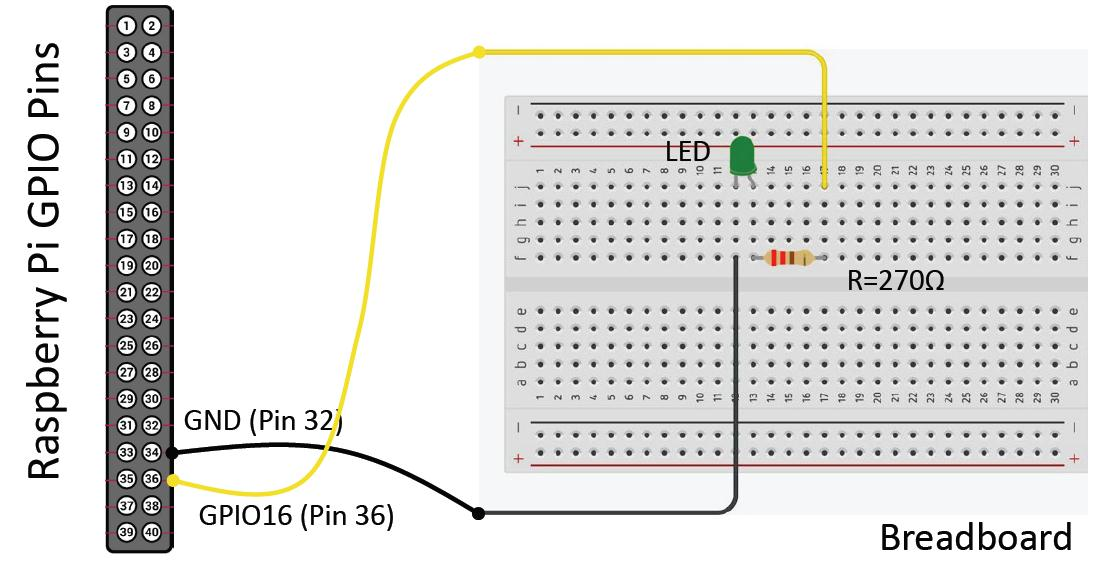
This simple script continuously blinks an LED connected to GPIO pin 16.
from gpiozero import LED  # Import LED control from gpiozero
from time import sleep    # Import sleep for delays

pin = 16          # Define the GPIO pin where the LED is connected
led = LED(pin)    # Create an LED object

while True:       # Infinite loop to blink the LED
  led.on()        # Turn the LED on
  sleep(1)        # Wait for 1 second
  led.off()       # Turn the LED off
  sleep(1)        # Wait for 1 second