Digital Number Systems
Introduction to Numbering Systems
Definition: A numbering system is a way to represent numbers in different bases.
Common Systems:
- Binary (Base-2)
- Octal (Base-8)
- Decimal (Base-10)
- Hexadecimal (Base-16)
Binary Number System (Base-2)
- Digits Used:
0,1 - Structure: Each digit in a binary number represents a power of 2, with the rightmost digit representing
, the next , and so on. - Usage: Binary is essential for computers, as digital circuits operate in two states (on/off).
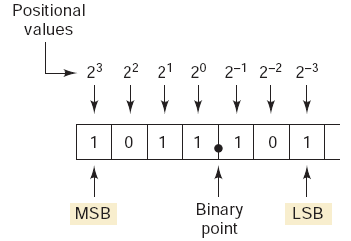
A Bit represents a single digit, Byte represents 8-bits.
- The most significant bit (MSB) is the leftmost bit (largest weight).
- The least significant bit (LSB) is the rightmost bit (smallest weight).
To calculate the largest number that can be represented using N bits, use the following formula:
Example: What is the largest number that can be represented using eight bits?
Summary: Using
Decimal Number System (Base-10)
- Digits Used:
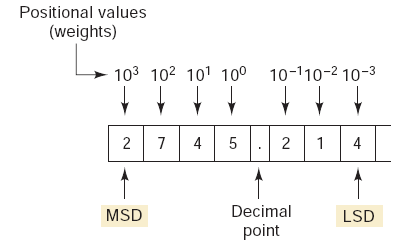
0~9 - Structure: Each digit represents a power of 10.
- Usage: Standard system used in everyday life for counting and arithmetic.
Hexadecimal Number System (Base-16)
- Digits Used:
0~9,A=10,B=11,C=12,D=13,E=14,F=15 - Structure: Each digit represents a power of 16.
- Usage: Widely used in programming, particularly for color codes in web design (e.g.,
#FF5733) and memory addresses.
Counting in Hexadecimal
Hexadecimal counting is base-16, where each digit increases from 0 to F. After F, the digit resets to 0 and a carry is added to the next higher position, exactly like decimal counting but with 16 symbols.
Example: 3D, 3E, 3F, 40, 41, 42 (F rolls over to 0 and increments the next digit: 3-> 4).
Using
Example: What is the largest number that can be represented using three digits?
We can count from
Octal Number System (Base-8)
- Digits Used:
0~7 - Structure: Each digit represents a power of 8.
- Historical Context: Used as a shorthand for binary in computing, though hexadecimal is more common today.
Conversions Between Number Systems
Binary to Decimal Conversion
- Each binary digit represents a power of 2.
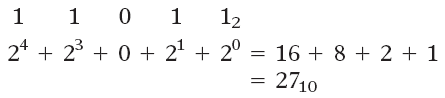
- Multiply each binary digit by its positional power of 2 and add the results.
Example:

Answer:
Example:
Answer:
Decimal to Binary Conversion: Division Method
To convert a decimal number to binary:
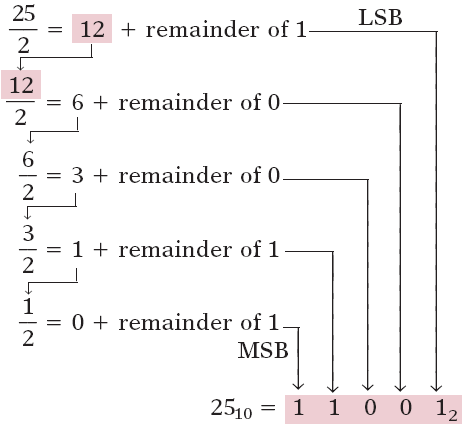
- Divide the number by 2.
- Write down the quotient (division result) and remainder.
- Repeat with the quotient until it reaches 0.
- The binary number is the remainders read in reverse order.
Example 1:
Answer 1:
Example 2:
remainder 1remainder 0remainder 1remainder 1
Answer 2:
Decimal to Binary Conversion: Subtraction Method
- Start with the largest power of 2 less than or equal to the number.
- Subtract that power of 2, write a
1in its position. - If the power of 2 is greater than the remainder, write
0.
Example 1: Convert Decimal 213 to Binary:
Powers of 2 to consider:128 64 32 16 8 4 2 1
Step-by-step:
- (213 - 128 = 85) ->
1in the128position - (85 - 64 = 21) ->
1in the64position 32 > 21->0in the32position- (21 - 16 = 5) ->
1in the16position 8 > 5->0in the8position- (5 - 4 = 1) ->
1in the4position 2 > 1->0in the2position- (1 - 1 = 0) ->
1in the1position
Binary:1101 0101
Example 2: Convert Decimal 168 to Binary:
-> 1in128position.-> 1in32position.-> 1in8position.
Binary: 1010 1000
Decimal to Octal Conversion
- Divide the decimal number by 8.
- Write down the remainder.
- Repeat until the quotient is 0.
- Read the remainders in reverse order.
Example: Convert Decimal 65 to Octal:
Remainder 1 Remainder 0 Remainder 1
Octal: 101
Decimal to Hexadecimal Conversion
- Divide by 16.
- Record quotient and remainder.
- Continue dividing until quotient is 0.
- Convert remainders above 9 to hexadecimal digits (e.g., 10 = A).
Example: Decimal 255 to Hexadecimal:
Remainder 15 (F) Remainder 15 (F)
Hexadecimal: FF
Octal to Binary Conversion
- Convert each octal digit to its 3-digit binary equivalent. Use the following reference table:
| Octal | Binary | Octal | Binary |
|---|---|---|---|
| 0 | 000 | 4 | 100 |
| 1 | 001 | 5 | 101 |
| 2 | 010 | 6 | 110 |
| 3 | 011 | 7 | 111 |
Example: Octal 57 -> Binary 101 111.
Binary to Octal Conversion
- Group binary digits into sets of three from the right.
- Convert each group to its octal equivalent.
Example: Binary 110 101 011 -> Octal 653.
Hexadecimal to Binary Conversion
- Convert each hexadecimal digit to its 4-bit binary equivalent. Use the following reference table:
| Hex | Binary | Hex | Binary |
|---|---|---|---|
| 0 | 0000 | 8 | 1000 |
| 1 | 0001 | 9 | 1001 |
| 2 | 0010 | A | 1010 |
| 3 | 0011 | B | 1011 |
| 4 | 0100 | C | 1100 |
| 5 | 0101 | D | 1101 |
| 6 | 0110 | E | 1110 |
| 7 | 0111 | F | 1111 |
Example: Hexadecimal 2A3 -> Binary 0010 1010 0011.
Binary to Hexadecimal Conversion
- Group binary digits into sets of four.
- Convert each group to hexadecimal.
Example: Binary 0001 1010 1101 -> Hexadecimal 1AD.
Summary
- Binary: A base-2 system using
0and1, essential for computing. - Decimal: Base-10 system, standard in everyday life.
- Hexadecimal: Base-16, using
0~9andA~F, used in IPv6 and MAC addresses. - Conversions:
- Binary <-> Decimal <-> Hexadecimal: Often requires intermediate binary representation.
- Decimal <-> Octal <-> Hexadecimal: Follow division methods or positional notation.
Binary-Coded Decimal (BCD)
BCD represents each decimal digit (0-9) with a 4-bit binary code.
| Decimal | BCD (4-bit Binary) |
|---|---|
| 0 | 0000 |
| 1 | 0001 |
| 2 | 0010 |
| 3 | 0011 |
| 4 | 0100 |
| 5 | 0101 |
| 6 | 0110 |
| 7 | 0111 |
| 8 | 1000 |
| 9 | 1001 |
BCD encodes decimal numbers for applications where decimal representation is important, such as digital displays, timers, calculators, and avometers.
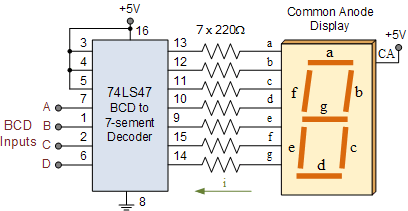
Example:
The decimal number 29 is represented in BCD as:
= =
Therefore,
Example:
Convert
Solution:
Split the number into 4-bit groups:
-> 6 -> 8 -> 3 -> 9
Combine the digits:
Decimal = 6839
BCD vs. Binary
| Aspect | Binary Code | BCD Code |
|---|---|---|
| Representation of | ||
| Encoding method | Entire number converted directly to base-2 | Each decimal digit encoded separately in 4 bits |
| Conversion to/from decimal | More complex | Simple and straightforward |
| Digits to remember | Full binary weighting | Only 4-bit codes for digits 0–9 |
| Hardware implementation | Requires more complex logic | Easier logic circuits |
| Main advantage | Compact representation | Ease of decimal conversion |
Gray Code
Gray code is a binary numbering system where only one bit changes between successive values, reducing errors caused by rapid signal changes in digital systems.
Key application:
Used in shaft position encoders to accurately represent mechanical rotation without ambiguity during transitions.
Conversion Examples
Example 1: Binary -> Gray
Convert Binary 101101 to Gray code.
Rule:
- Gray MSB = Binary MSB
- Each next Gray bit = XOR of current binary bit with previous binary bit
Step-by-step:
| Binary (B) | Operation | Gray (G) |
|---|---|---|
| 1 | MSB copied | 1 |
| 0 | 1 | |
| 1 | 1 | |
| 1 | 0 | |
| 0 | 1 | |
| 1 | 1 |
Result:
Binary 101101 -> Gray 111011
Example 2: Gray -> Binary
Convert Gray 111011 back to binary.
Rule:
- Binary MSB = Gray MSB
- Each next Binary bit = XOR of current Gray bit with previous binary bit
Step-by-step:
| Gray (G) | Operation | Binary (B) |
|---|---|---|
| 1 | MSB copied | 1 |
| 1 | 0 | |
| 1 | 1 | |
| 0 | 1 | |
| 1 | 0 | |
| 1 | 1 |
Result:
Gray 111011 -> Binary 101101
Byte, Nibble, and Word
- A byte is 8 bits and is the standard unit for storing data.
- A nibble is 4 bits (half a byte).
- A word is the number of bits a system processes at once and depends on the CPU architecture.
Example:
A 64-bit processor has a word size of 64 bits (8 bytes), while a simple microcontroller may have an 8-bit word size.
Alphanumeric Codes and ASCII Code
Computers use alphanumeric codes to represent letters, numbers, punctuation, and symbols.
These codes allow non-numerical information to be processed and transmitted.
ASCII is a 7-bit code with 128 possible characters.
Used for keyboard input, internal storage, and communication with external devices.
Example:
ASCII for'A'=0100 0001(decimal 65).
Parity Method for Error Detection
- A parity bit is added to transmitted data to detect errors.
- Even parity: total number of 1s (including parity bit) is even.
- Odd parity: total number of 1s is odd.
Example:
Data101 1001has four 1s -> even parity bit =0(they are already even -> 4).
Data110 0011has four 1s -> odd parity bit =1(to make them odd -> 5).
ASCII with Even Parity Example (HELLO)
7-bit ASCII + 1 parity bit:
- H ->
100 1000(2 ones) -> parity0->0100 1000 - E ->
100 0101(3 ones) -> parity1->1100 0101 - L ->
100 1100(3 ones) -> parity1->1100 1100 - L ->
100 1100(3 ones) -> parity1->1100 1100 - O ->
100 1111(5 ones) -> parity1->1100 1111
These 8-bit strings are what would be transmitted using ASCII with even parity.