Operating System Lecture 1-2: Introduction
https://youtube.com/playlist?list=PLqPgC1TA0L1moyG1SsYV2tilN6Cttf7My&si=ca6qnkqhU6IhR5Rc
Reference
- Topics covered:
- Introduction to Operating System
- Process Management
- CPU Scheduling
- Deadlocks
- Memory Management
- I/O Systems
- Protection and Security
What is an Operating System?
- Definition: A program that acts as an intermediary between a computer user and the computer hardware.
- Goals:
- Execute user programs to simplify problem-solving.
- Make the computer system convenient to use.
- Utilize computer hardware efficiently.
- Kernel: The core program running at all times on the computer.
- Programs:
- System programs: Included with the operating system.
- Application programs: All other programs.
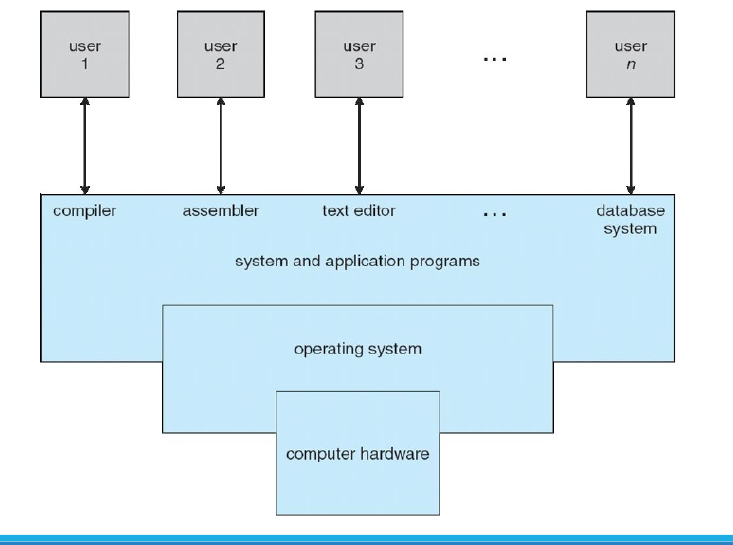
Computer System Structure
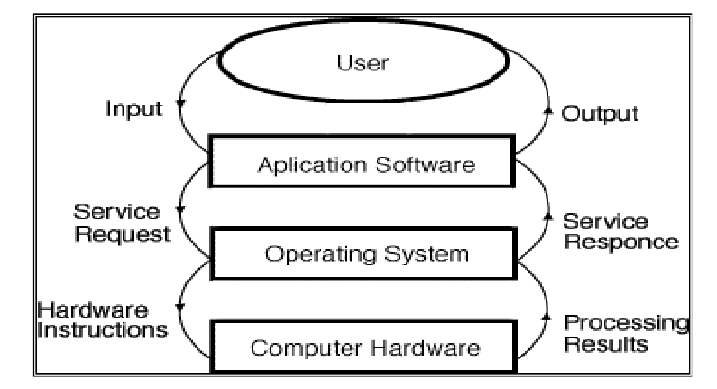
- Hardware: Provides basic computing resources (CPU, memory, I/O devices).
- Operating System: Manages resource usage to solve user computing problems (e.g., word processors, compilers, web browsers, databases, video games).
- Users: People, machines, or other computers interacting with the system.
Services Provided by Operating Systems
- Program Execution:
- Loads programs into memory and runs them.
- Supports normal or abnormal (error) termination.
- I/O Operations:
- Manages input/output for programs, as users cannot directly control I/O devices for efficiency and protection.
- File-System Manipulation:
- Enables programs to read, write, create, delete, and search files and directories.
- Includes permissions management for access control.
- Communications:
- Facilitates information exchange between processes, either on the same computer (via shared memory) or across networked systems (via message passing).
- Shared Memory: When two or more processes read and write to a shared section of memory.
- Message Passing: When packets of information in predefined formats are moved between processes by the operating system.
- Error Detection:
- Continuously detects and corrects errors in:
- CPU and memory hardware (e.g., memory errors, power failures).
- I/O devices (e.g., disk parity errors, network failures, printer issues).
- User programs (e.g., arithmetic overflow, illegal memory access, excessive CPU usage).
- Continuously detects and corrects errors in:
- Resource Allocation:
- Manages resources for multiple users or jobs, allocating CPU, memory, and I/O devices.
- Accounting:
- Tracks resource usage by users for monitoring and optimization.
- Protection and Security:
- Ensures controlled access to system resources.
- Authenticates users and defends against invalid access attempts, including external I/O devices and network adapters.
Historical Overview
Mainframe Systems
- Overview: First computers for commercial and scientific applications.
- Batch Systems:
- Large machines operated via consoles.
- Input: Card readers, tape drives.
- Output: Line printers, tape drives, card punches.
- Users submitted jobs (punch cards) to operators, with no direct interaction.
- OS was simple, transferring control between batched jobs with similar needs for efficiency.
- Multiprogrammed Systems:
- Multiple jobs in memory, with CPU multiplexed among them.
- OS switches to another job when one waits (e.g., for I/O).
- Time-Sharing Systems:
- Extension of multiprogramming, with frequent CPU switching for user interaction.
- Supports multiple users simultaneously via mouse/keyboard input.
Personal Computer Systems
- Dedicated to a single user.
- I/O devices: Keyboards, mice, displays, small printers.
- Prioritizes user convenience and responsiveness.
- May not require advanced CPU utilization or protection features.
Multiprocessor Systems (Parallel Systems)
- Overview: Multiple CPUs in close communication, sharing memory and clock.
- Advantages:
- Increased throughput (more work in less time).
- Cost-effective (shared peripherals, storage, power).
- Improved reliability (system continues if one processor fails).
- Types:
- Symmetric Multiprocessing (SMP): Each processor runs an identical OS copy, supporting multiple processes without performance loss.
- Asymmetric Multiprocessing: Master processor assigns tasks to slave processors, common in large systems.
Distributed Systems
- Computation distributed across multiple processors with local memory.
- Loosely coupled, communicating via high-speed buses or networks.
- Advantages:
- Resource sharing.
- Computation speedup through load sharing.
- Enhanced reliability.
- Improved communication.
Computer System Organization
- Operation:
- CPUs and device controllers connect via a common bus to shared memory.
- Concurrent execution of CPUs and devices, competing for memory cycles.
- I/O Operations:
- CPU and I/O devices execute concurrently.
- Device controllers manage specific devices with local buffers.
- CPU moves data between main memory and controller buffers.
- Controllers signal completion via interrupts.
Interrupts
- Function: Transfer control to interrupt service routines via an interrupt vector.
- Types:
- Hardware interrupts: Triggered by signals to the CPU.
- Software interrupts: Triggered by system calls.
- Process: Saves the address of the interrupted instruction.
Digital Data Representation
- Bit: Smallest data unit (1 or 0).
- Byte: 8 bits, used to measure file and program sizes.
- Prefixes:
- Kilobyte (KB):
bytes (1024 bytes). - Megabyte (MB):
bytes (1024 KB). - Gigabyte (GB):
bytes (1024 MB). - Terabyte (TB):
bytes (1024 GB). - Petabyte (PB), Exabyte (EB), Zettabyte (ZB), Yottabyte (YB) follow similarly.
- Kilobyte (KB):
Storage Hierarchy
- Organized by speed, cost, and volatility.
- Caching: Copies data to faster storage (e.g., main memory as a cache for secondary storage).
- Device Drivers: Provide a uniform interface between controllers and the OS kernel.
Storage Structure
- Main Memory:
- Only storage directly accessible by the CPU.
- Random access, typically volatile.
- Secondary Storage:
- Extends main memory with large, nonvolatile capacity.
- Hard Disks: Magnetic platters divided into tracks and sectors.
- Solid-State Disks (SSDs): Faster, nonvolatile, increasingly popular.
- Disk Controllers: Manage logical interactions between devices and the computer.
Caching
- Copies data from slower to faster storage temporarily.
- Process:
- Check cache first; use data if present (fast).
- If absent, copy data to cache for use.
- Challenges:
- Cache size and replacement policy are critical design considerations.
- Cache is smaller than the storage it caches.