Programming Essentials in Python Section 5
Loops in Python
Loops allow the execution of a block of code repeatedly as long as a specified condition is met. They save time, reduce errors, and make code more readable. Python supports three types of loops:
whileloopdo whileloop (not directly available but can be emulated using awhileloop)forloop
while Loop
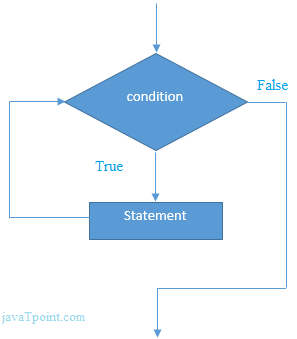
A while loop is used to repeatedly execute a block of code as long as the condition evaluates to True.
It is recommended for use when the number of iterations is not fixed.
Syntax:
while condition:
  # Block of statements
  print("This will execute as long as the condition is True")
Example:
x = 1
while x <= 10:
  print(x)  # Prints numbers from 1 to 10
  x += 1
flowchart representation:
Common Pitfall: Infinite Loops
An infinite loop occurs if the condition in a while loop always evaluates to True.
Example:
a = 1
while a == 1:  # This condition is always True
  b = input("What's your name? ")
  print(f"Hi {b}, welcome to the infinite loop!")
# To terminate, use keyboard interrupt (Ctrl+C).
break Statement
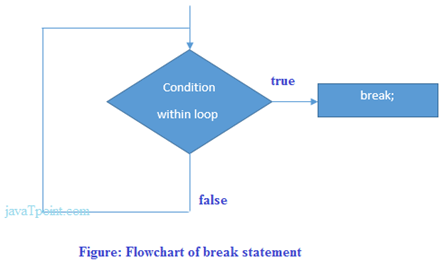
The break statement is used to exit a loop prematurely, irrespective of the loop's condition.
Example:
counter = 0
while True:
  counter += 1
  print(counter, end=' ')
  if counter >= 6:
    print("\nBreaking the loop!")
    break  # Exits the loop
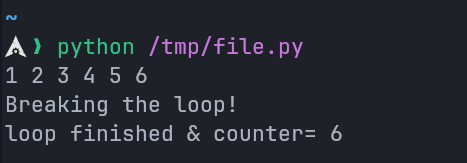
print(f"Loop finished & counter = {counter}")
Output:
flowchart representation:
continue Statement
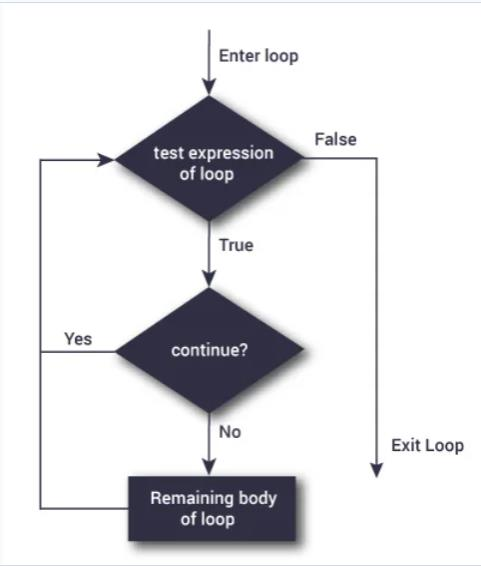
The continue statement skips the rest of the code in the current iteration and moves to the next iteration of the loop.
Example:
counter = 0
while True:
  counter += 1
  if counter % 2 == 0:
    continue  # Skips the even numbers
  print(f"Odd: {counter}")
  if counter >= 5:
    print("Breaking the loop!")
    break  # Exits the loop
flowchart representation:
range() Function
The range() function generates a sequence of numbers, often used in loops.
Syntax: range(start, stop, step)
| Parameter | Description | Default |
|---|---|---|
start | Optional. Start position of the sequence. | 0 |
stop | Required. Stop position (exclusive). | None |
step | Optional. Increment between each number in the sequence. | 1 |
Example:
# Generate numbers from 3 to 19, incrementing by 2
for i in range(3, 20, 2):
  print(i, end=" ")  # Output: 3 5 7 9 11 13 15 17 19
for Loop
The for loop is used to iterate over sequences (like lists, tuples, or strings) or other iterable objects. This process is called traversal.
Syntax:
for variable in sequence:
  # Block of statements
  print(variable)
Example:
for i in range(1, 6):
  print(i, end=' ')  # Output: 1 2 3 4 5
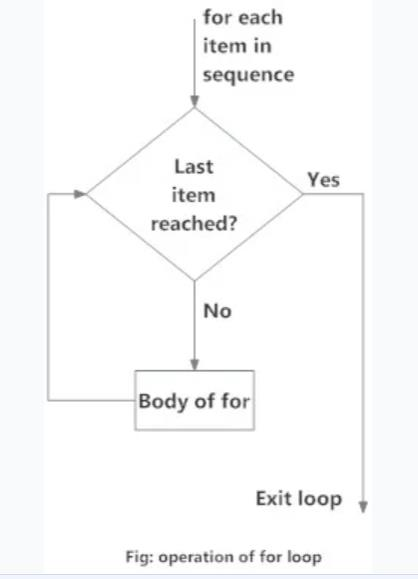
flowchart representation:
Tasks and Challenges:
Task 1: Custom Range
Generate a sequence of numbers starting from 3 to 19, incrementing by 2:
for i in range(3, 20, 2):
  print(i, end=" ")  # Output: 3 5 7 9 11 13 15 17 19