Programming Essentials in Python Section 6
Tuples vs Lists
- Tuples and Lists are both data structures in Python that store collections of items.
- Key Differences:
- Tuples are immutable, meaning their elements cannot be changed once assigned. Lists are mutable and can be modified.
- Tuples are generally used for different data types, while lists are used for similar data types.
- Iterating through a tuple is faster than a list because of its immutability.
Tuples
- Definition: A tuple is an ordered, immutable collection of items.
- Usage: Tuples are often used when you want to ensure the data remains unchanged.
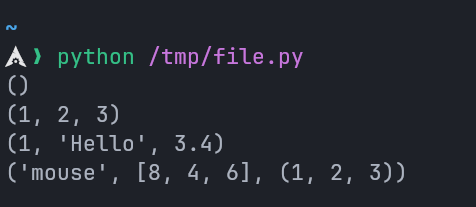
python
# Empty tuple
my_tuple = ()
print(my_tuple)

# Tuple having integers
my_tuple = (1, 2, 3)
print(my_tuple)

# tuple with mixed datatypes
my_tuple = (1, "Hello", 3.4)
print(my_tuple)

# nested tuple
my_tuple = ("mouse", [8, 4, 6], (1, 2, 3))
print(my_tuple)
Output:
Creating Tuples with One Element
- Creating a tuple with one element is a bit tricky. Having one element within parentheses is not enough.
- We will need a trailing comma to indicate that it is a tuple
python
# Without a comma, it's not a tuple
var1 = (1)
print(type(var1))  # Output: <class 'int'>

# With a comma, it becomes a tuple
var2 = (1,)
print(type(var2))  # Output: <class 'tuple'>

# Parentheses are optional for multiple elements
var3 = 1, 2, 3 # Same as (1, 2, 3)
print(type(var3))  # Output: <class 'tuple'>

# Single element tuple without parentheses
var4 = 1,
print(type(var4))  # Output: <class 'tuple'>
Accessing Tuple Elements
- Tuple elements can be accessed using their index.
python
languages = ('Python', 'Swift', 'C++')

# Access the first item
print(languages[0])  # Output: Python

# Access the third item
print(languages[2])  # Output: C++
Slicing Tuples
python
my_tuple = ('p', 'r', 'o', 'g', 'r', 'a', 'm', 'i', 'z')

# Elements from 2nd to 4th index
print(my_tuple[1:4])  # Output: ('r', 'o', 'g')

# Elements from beginning to 3rd
print(my_tuple[:-6])  # Output: ('p', 'r', 'o')

# Elements from 8th to end
print(my_tuple[7:])  # Output: ('i', 'z')

# All elements
print(my_tuple[:])  # Output: ('p', 'r', 'o', 'g', 'r', 'a', 'm', 'i', 'z')
Tuple Methods
Tuples support only two methods:
count(): Counts the occurrences of an element in the tuple.index(): Returns the index of the first occurrence of an element.
python
my_tuple = ('a', 'p', 'p', 'l', 'e')

print(my_tuple.count('p'))  # Output: 2
print(my_tuple.index('l'))  # Output: 3
Iterating Through a Tuple
python
languages = ('Python', 'Swift', 'C++')

# Iterating through the tuple
for language in languages:
  print(language)
Check if an Item Exists in Tuple
python
languages = ('Python', 'Swift', 'C++')

print('C' in languages)       # Output: False
print('Python' in languages)  # Output: True
Dictionaries
- Definition: A dictionary is an ordered collection of key-value pairs (starting from Python 3.7).
- Usage: Useful for storing data with unique keys.
Creating a Dictionary
python
# Example 1
countries = {
  "Egypt": "Cairo",
  "America": "Washington",
  "England": "London"
}
print(countries)

# Example 2 (Keys and values of different data types)
data = {
  "string": "Hello",
  1: "Integer",
  True: "Boolean"  # 1 and True will overwrite each other because they're the same
}
print(data)
Output:

Adding Elements to a Dictionary
python
data = {
  "Egypt": "Cairo",
  "America": "Washington DC",
  "England": "London"
}

# Add new entry
data["Japan"] = "Tokyo"
print(data)
Modifying Values
python
data = {
  "name": "Othman",
  "age": 18
}

# Modify value
data["age"] = 19
print(data)
Accessing Dictionary Elements
python
data = {
  "name": "Othman",
  "age": 19
}

# Access value using key
print(data["name"])  # Output: Othman
Dictionary Methods
get() Method
- Retrieves the value of a key. Returns
Noneif the key does not exist.
python
data = {
  "Egypt": "Cairo",
  "America": "Washington DC",
  "England": "London"
}

print(data.get("Egypt"))   # Output: Cairo
print(data.get("Brazil"))  # Output: `None` (known as `null` in other languages)
keys() and values() Methods
keys(): Returns all keys.values(): Returns all values.
python
data = {
  "Egypt": "Cairo",
  "America": "Washington DC",
  "England": "London"
}

print(data.keys())   # Output: dict_keys(['Egypt', 'America', 'England'])
print(data.values()) # Output: dict_values(['Cairo', 'Washington DC', 'London'])
items() Method
- Returns each key-value pair as tuples in a list.
python
data = {
  "Egypt": "Cairo",
  "America": "Washington DC",
  "England": "London"
}

print(data.items())
Output:
Removing Items from a Dictionary
Using del
- Deletes a specific key or the entire dictionary.
python
data = {
  "Egypt": "Cairo",
  "America": "Washington DC",
  "England": "London"
}

# Remove an entry
del data["Egypt"]
print(data)  # Output: {'America': 'Washington DC', 'England': 'London'}

# Delete the dictionary
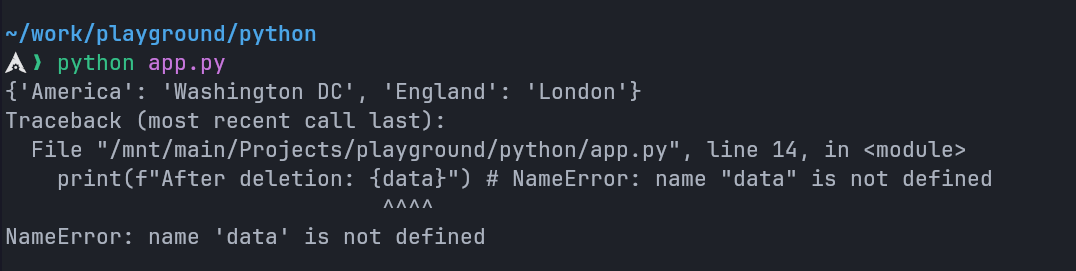
del data

print(f"After deletion: {data}") # NameError: name "data" is not defined
CAUTION
The del statement deletes the whole variable not only the dictionary.
Any attempt to access it later would raise a NameError.
Using pop()
- Removes the specified key and returns its value. Raise
KeyErrorif the key is not found.
python
data = {
  "Egypt": "Cairo",
  "America": "Washington DC",
  "England": "London"
}

value = data.pop("America") # Would raise a `KeyError` if key not found.
print(value)  # Output: Washington DC
print(data)   # Output: {'Egypt': 'Cairo', 'England': 'London'}
Using popitem()
- Removes the last inserted key-value pair. If the dictionary is empty it would raise a
KeyError
python
data = {
  "Egypt": "Cairo",
  "America": "Washington DC",
  "England": "London"
}

item = data.popitem() # Would raise a `KeyError` if dictionary is empty.
print(item)  # Output: ('England', 'London')
print(data)  # Output: {'Egypt': 'Cairo', 'America': 'Washington DC'}
Check if a Key Exists in Dictionary
- We can test if a key is in a dictionary or not using the keyword
in.
python
data = {
  "Egypt": "Cairo",
  "America": "Washington DC",
  "England": "London"
}

print("Brazil" in data) # False
print("Egypt" in data) # True
print("Japan" not in data) # True
NOTE
The membership test is only for the keys and not for the values.
Iterating Through a Dictionary
python
squares = {
  "1": 1,
  "3": 9,
  "5": 25,
  "7": 49,
  "9": 81
}

print("Keys & Values:")
# Iterate over keys and values
for key, value in squares.items():
  print(f"{key}: {value}")

print("\nKeys Only:")
# Iterate over keys
for key in squares:
  print(key)
Other Dictionary Methods
| Method | Description |
|---|---|
clear() | Removes all elements from the dictionary |
copy() | Returns a shallow copy of the dictionary |
fromkeys() | Creates a dictionary from the given keys and value |
get() | Retrieves the value of a key |
items() | Returns a view object with key-value pairs |
keys() | Returns a view object with dictionary keys |
pop() | Removes the specified key and returns its value |
popitem() | Removes the last inserted key-value pair |
setdefault() | Inserts a key with a default value if the key does not exist |
update() | Updates the dictionary with the specified key-value pairs |
values() | Returns a view object with dictionary values |