IT Essentials Lab 4: Number Systems and Arithmetic Operations
Binary Arithmetic Operations
Binary numbers use only two digits: 0 and 1. Arithmetic operations are performed using similar principles to decimal arithmetic but with a base of 2.
Binary Addition
Binary addition follows these rules:
(with a carry of ) (with a carry of )
Example:
  1011 (11 in decimal)
+ 0110 (6 in decimal)
------
 10001 (17 in decimal)
Explanation:
- Rightmost column:
- Second column from right:
(carry-over ) - Third column from right:
(carry-over) (carry-over ) - Leftmost column:
(carry-over)
Binary Subtraction
Binary subtraction also has specific rules:
(borrow from the next higher bit)
Example:
  1101 (13 in decimal)
- 0110 (6 in decimal)
------
  0111 (7 in decimal)
Explanation:
- Rightmost column:
- Second column from right:
(borrow from the third column, third column is now ) - Third column from right:
(borrow from the fourth column, fourth column is now ) - Leftmost column:
Binary Multiplication
Binary multiplication is similar to decimal multiplication:
Example:
    101 (5 in decimal)
x   110 (6 in decimal)
--------
    000
   1010
+ 10100
--------
  11110 (30 in decimal)
Explanation:
- First step is to mulitply
- Next, multiply
(In the second digit one zero, on the third we add two zeros and so on) - Next, mulitply
- Finally we will add the results
ASCII Code
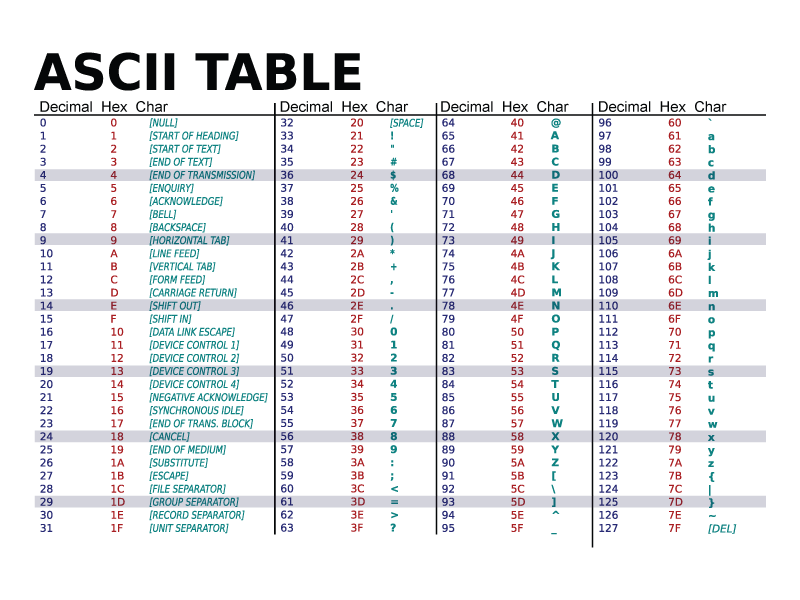
ASCII (American Standard Code for Information Interchange) is a character encoding standard for electronic communication. Each character (letters, numbers, symbols) is assigned a unique 7-bit binary code (ranging from 0 to 127).
Character ranges:
- Digits: ASCII values from 48 ->
0to 57 ->9. - Uppercase Letters: ASCII values from 65 ->
Ato 90 ->Z. - Lowercase Letters: ASCII values from 97 ->
ato 122 ->z.
Example:
A(decimal) = (binary) a(decimal) = (binary) 0(decimal) = (binary)
Binary-Coded Decimal (BCD)
BCD represents each decimal digit (0-9) with a 4-bit binary code.
Example:
The decimal number 29 is represented in BCD as:
= =
Therefore,
BCD is useful for applications where decimal representation is important, such as digital displays.
| Decimal | BCD (4-bit Binary) |
|---|---|
| 0 | 0000 |
| 1 | 0001 |
| 2 | 0010 |
| 3 | 0011 |
| 4 | 0100 |
| 5 | 0101 |
| 6 | 0110 |
| 7 | 0111 |
| 8 | 1000 |
| 9 | 1001 |
Practice Your Learning
1. Numbering Systems Conversion
Convert the decimal number 45 into binary, octal, and hexadecimal.
Solution:- Binary:
- Octal:
- Hexadecimal:
2. Binary Addition
Add the binary numbers 1011 and 1101.
Solution: 1011
+ 1101
------
11000 (Binary)Decimal equivalent:
3. Binary Subtraction
Subtract the binary number 1101 from 10101.
Solution: 10101
- 1101
--------
1000 (Binary)Decimal equivalent:
4. Binary Multiplication
Multiply the binary numbers 101 and 11.
Solution: 101
× 11
--------
101
+ 1010
--------
1111 (Binary)Decimal equivalent:
5. ASCII Code
What is the ASCII code for the character "A"
Solution:
- ASCII code for
Ais(decimal) or (binary).
Find the character corresponding to the ASCII code 97.
Solution:- ASCII code
97corresponds to the charactera.
6. Binary-Coded Decimal (BCD)
Convert the decimal number 59 into BCD.
Solution:- Decimal
59in BCD:
7. BCD to Decimal
Convert the BCD 0110 0101 into decimal.
Solution:- BCD
corresponds to decimal .