Programming Essentials in Python Lecture 4
The eval() Function in Python
The eval() function evaluates a string as if it were Python code, making it extremely versatile. Below is a summary of its usage with examples.
Basic Usage
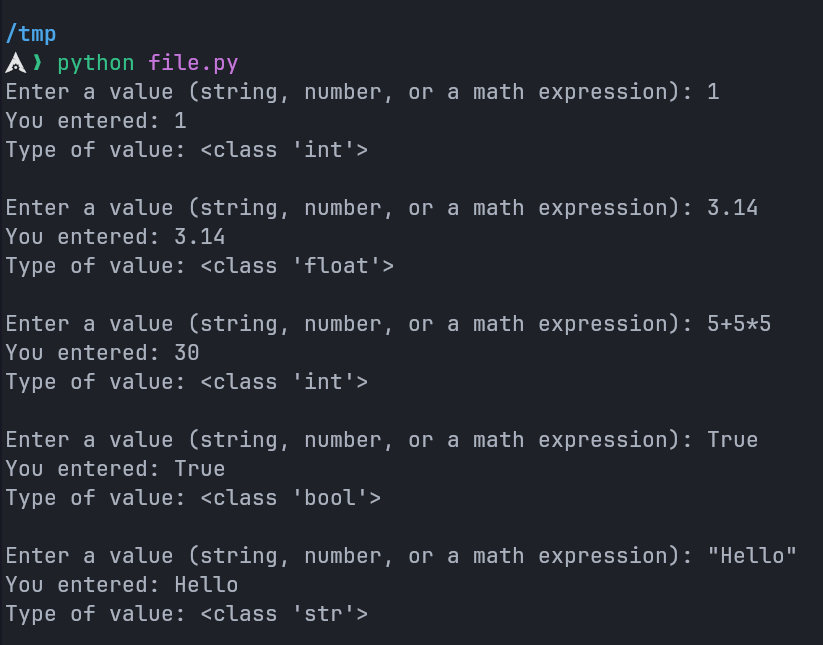
The eval() function processes a string input and evaluates it in the current context:
# Example: Evaluating basic inputs
value = eval(input("Enter a value (string, number, or a math expression): "))
print("You entered:", value)
print("Type of value:", type(value))
Evaluating Various Input Types
Arithmetic Expression Evaluation
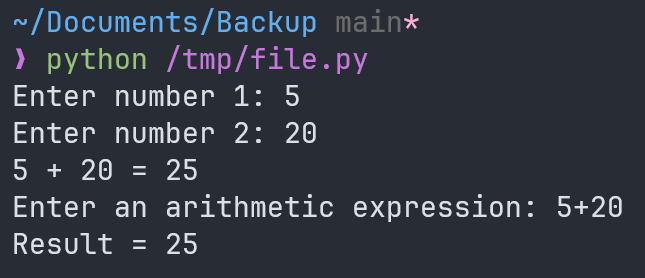
The eval() function can evaluate arithmetic expressions input by the user:
# Example: Handling arithmetic expressions
num1 = eval(input("Enter number 1: "))  # 5
num2 = eval(input("Enter number 2: "))  # 20
print(num1, "+", num2, "=", num1 + num2) # 5 + 20 = 25

# Example: Direct expression evaluation
result = eval(input("Enter an arithmetic expression: "))  # 5 + 20
print("Result =", result) # Result = 20
Output:
Handling Variables Dynamically
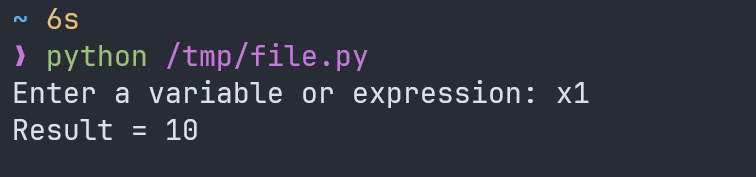
The eval() function resolves variable names if they exist in the current context. If not, it raises a NameError.
x1 = 10  # Define a variable
user_input = eval(input("Enter a variable or expression: "))  # x1
print("Result =", user_input) # 10
Output Example:
Bugs in Python Programs
In Python, errors can generally be categorized into three types: syntax errors, runtime errors, and logic errors. Understanding and identifying these errors is crucial for debugging and writing reliable code.
Syntax Errors
A syntax error occurs when Python's interpreter cannot translate a statement into machine code due to incorrect syntax. These errors are detected during the parsing phase, before execution begins.
Examples of Syntax Errors
# SyntaxError: cannot assign to expression here. Maybe you meant '==' instead of '='?
if x = 5:
  print("Incorrect syntax!")  # Correct: Use '==' for comparison, not '=' for assignment.

# SyntaxError: unexpected indent
    dividend = eval(input('Enter numbers to divide: '))  # Unexpected indent.

# SyntaxError: invalid character (U+2018)
dividend = eval(input('Enter numbers to divide: '))  # Incorrect quotes (smart quotes).

# Correct syntax:
dividend = eval(input('Enter numbers to divide:'))  # Correct usage of quotes and indentation.
Runtime Errors
A runtime error (or exception) occurs while the program is executing. These errors are context-dependent and only arise during the program's runtime.
Examples of Runtime Errors
# NameError: Using a variable that hasn't been defined
x = N + 2  # Variable 'N' is not defined.
# Output:
# NameError: name 'N' is not defined

# ZeroDivisionError: Division by zero
num1 = eval(input('Enter first number to divide: '))  # Example input: 40
num2 = eval(input('Enter second number to divide: '))  # Example input: 0
print(num1, '/', num2, "=", num1 / num2)
# Output:
# ZeroDivisionError: division by zero
Preventing Runtime Errors
# Safeguard against division by zero
num1 = eval(input('Enter first number to divide: '))
num2 = eval(input('Enter second number to divide: '))
if num2 != 0:
  print(num1, '/', num2, "=", num1 / num2)
else:
  print("Error: Division by zero is not allowed.")
Logic Errors
A logic error occurs when the program runs without crashing but produces incorrect results. These errors stem from flaws in the algorithm or code logic.
Example of a Logic Error
# Incorrect logic
num1 = 40
num2 = 5
result = num2 / num1  # Logic error: Should be dividend / divisor.
print("Result:", result)  # Produces incorrect output.
Corrected Code
num1 = 40
num2 = 5
result = num1 / num2  # Correct logic.
print("Result:", result)  # Output: 8.0
Control Structures (if Statements)
Boolean expressions enable programs to adapt based on conditions. The if statement executes specific blocks of code when conditions evaluate to True.
Basic if Statement
age = 15
if age <= 18:
  print("You are still a boy.")

age = 20
if age >= 18:
  print("You are in the youth stage.")
if-else Example
n = 14
if 0 <= n <= 20:
  print(n, "is accepted.")
else:
  print(n, "is not accepted!")
Using and and or in Conditions
x = 2
if x == 1 or x == 2 or x == 3:
  print(x, "is available.")
else:
  print(x, "is not available!")

a, b, c = 200, 33, 500
if a > b and c > a:
  print("Both conditions are True")

a, b = 33, 200
if not a > b:
  print("a is NOT greater than b")
Nested if Statements
x = 41
if x <= 20:
  print("x is less than or equal to 20!")
  if x >= 5:
    print("x is between 5 and 20!")
else:
  print("x is greater than 40!")
Summary
- Syntax Errors: Issues with code structure or syntax; identified before program execution.
- Runtime Errors: Errors occurring during execution, such as division by zero or using undefined variables.
- Logic Errors: Flaws in the code logic that lead to incorrect results despite successful execution.
Understanding these errors and how to handle them is essential for writing robust Python programs.